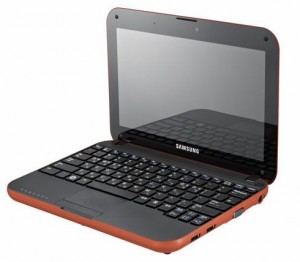
samsung-n310-300x262

UPDATED May 5 2010

Note: I don’t personally own an N310. I don’t have access to one either, as the owner of this one went back to the States with it.
Updates to this page are mostly from the comments people have made. When I can assist I have / will, but as I don’t own an actual N310, I rely on you for feedback!

One of my friends brought round a notebook for me to Hackintosh yesterday. Unlike the usual god no… kind of options I get given, this is actually a nice machine.
This one is almost as Mac friendly as my current Nano sized Hackintosh (aka Loz’s Hackbook Nano)

I present the next best thing in Mini Mac’s (until the will it? won’t it? Mac Tablet comes out! (ok, so it came out already, and its a bit meh..) ) – The Samsung N310

The Samsung is a generic Atom based Netbook with the following hardware:

CPU Intel Atom N270, 1600 Mhz
Chipset Intel 82945GSE Graphics Controller
Graphics Card Intel GMA 950
Audio Realtek ALC272
Wifi Atheros AR5007EG Wireless
Ethernet Marvell Yukon 88E8040 PCI-E Fast Ethernet
Bluetooth Adapter USB Based Generic
Webcam USB Based Namuga 1.3M

Installation is remarkably easy.
You’ll need the following things – an External USB DVD drive, and Snow Leopard.

Suggest before you install anything, update your BIOS to the latest version. This should be something like BIOS version 06BA or newer.
The bios updates are windows only, so you’ll need to do that before installing OSX, or have some other method of booting into Windows afterwards (google for Hiren Boot CD 10 for something that will provide a bootable Windows XP amongst other tools).

There are two bios files that are available currently. This first one is the one that you will likely have to use:

http://downloadcenter.samsung.com/content/FM/201002/20100203094911375/Win_N310_06BA.exe

And here is the second one:

http://downloadcenter.samsung.com/content/FM/201003/20100302094206890/Win_N310_01BD.exe

CHECK YOUR VERSION OF YOUR BIOS IN YOUR BIOS. IF YOUR VERSION ENDS IN A “BA”, USE THE FIRST ONE. IF IT ENDS IN “BD”, USE THE SECOND ONE.

Ready?

Download the latest NetbookInstaller ISO from here – http://osx.mechdrew.com/downloads/
Burn to CD. Connect your USB drive to the N310, and boot off of the newly burned CD.

Follow the instructions to swap with your Snow Leopard DVD at the appropriate time, and boot into the installer.
Install as normal (in my case, I just wiped the existing partitions, set the boot type to GUID instead of MBR in Partition, Options, and did a full install)
Once the OS reboots (or finishes with a cannot install error right at the end – don’t worry, its not a problem!).
Reboot into the NetbookInstaller ISO again, but this time choose the HDD (as we still need to install a valid bootsector for the OS to run)

The OS should boot up ok, fill in the relevant bits and pieces, and get to the desktop screen.
Open up NetBookMaker from the CD, navigate to the Tools folder and open NetbookInstaller:

I did this using 0.8.3RC4, but newer versions should be similar. Current version is 0.84rc1 as of April 2010.
Click Continue for the Unrecognized Hardware Prompt.

Choose the correct disk in the Volume Dropdown, and
Check Install Chameleon 2
Check Install General Extensions
Check Generate a System Specific DSDT.AML file.
Uncheck everything else.

Click Install.

It should trundle away for a few minutes, then recommend you reboot.

Remove the NetbookInstaller DVD, and make sure that you can reboot ok from the Hard Drive

Right now you should have working Webcam, Video, Bluetooth, and Trackpad will support 2 finger scroll (go to System / Preferences/ Trackpad to configure)

We’re still missing Wifi, Audio, and you’ll notice that sleep doesn’t quite work yet.
To install those, we’ll need to set some BIOS parameters, and replace the wifi card.

Wifi – the original card is a crap atheros. I couldn’t be buggered looking for drivers, and immediately swapped it out for a Dell1390 Broadcom card. Cheap, and the same as real Macbooks, so no driver issues. Should be about $8 on eBay (RMB50 or so locally in China on Taobao).

The N310 is reasonably easy to disassemble, just remove all the plastic plugs underneath (including the larger feet ones), and remove the screws. Gently remove the case bottom, and replace the wifi card.
If you use the Dell1390 you won’t need to install any drivers, they’re built in, yay!

Enabling Sleep / Brightness (working on 10.6.3 / BIOS 06BA apparently ) -

Go into the BIOS and set the following:

EDB = Enabled
Legacy USB Support: Disabled
USB S3 Wake-Up = Enabled

Boot into OSX

You’ll need to replace the DSDT.aml from NetbookMaker with the one below.

I’ve uploaded a DSDT.aml for the n310 here – DSDT.aml.
To use, rename file to DSDT.aml, and copy to /Extra, then reboot.

This also apparently works for Brightness control with the latest BIOS revision on 10.6.3. You’ll have to change brightness from the System Prefs / Displays / Brightness though, as the function keys aren’t mapped.

Note: If you do mess around with DSDT.aml files, please have a working recovery method available that you can access the hard drive with (eg an OSX Install DVD + Boot132 CD). Apple’s install DVD can also be used for recovery.

If you find that you can’t boot after installing the DSDT.aml, boot from the Boot132 CD or USB, then boot into to the OSX install DVD. Go to terminal in the installer, and delete the offending file, then reboot.

For the remaining drivers:
Download the zip below for modified Bluetooth (to enable bluetooth on / off keyboard switch), and 10.6.3 compatible Audio drivers (kexts) for the N310.

Thanks to Breathless for modifying the Bluetooth, and emailing me both files.

Samsung N310 Audio and Bluetooth Kexts

Copy to /Extras/GeneralExtensions, then rebuild the Extension cache.

You can do that manually or use a tool. NetbookInstaller nicely places a program called UpdateExtra into the /Extra folder which can rebuild the Extension cache for you. Reboot once done, and you should be good.

Thats pretty much it!

—-

Now you should have a fully working Samsung N310 running OSX Snow Leopard!

The brightness (via Displays System Prefs panel), sleep, audio and bluetooth should all be working fine. The wifi too (assuming you replaced the mini pci-e card as recommended)
The volume on/off keyboard functions should work, the trackpad on/off.

Thanks to Breathless for the feedback so I could update this page.

Good luck with yours!

Useful links:
http://www.kexts.com – kexts (drivers) for OSX
http://www.superhai.com/darwin.html – Power related drivers for OSX
http://osx.mechdrew.com/ – MechDrew from MyDellMini’s site on Hackintosh Installs
http://cid-8b65993ef55cf014.skydrive.live.com/browse.aspx/.Public/OSx86/Snow%20Leopard – some Czech site hosted on live.com full of goodies/ kexts

383 Comments to “Samsung N310 (Samsung Go) Hackintosh Installation on Snow Leopard”

  • momasawa says:

    hi. thanks a lot for this interesting post! i also have the samsung n310 and i’m loving it. but with 10.6.2, wifi doesn’t work. airport doesn’t even appear anywhere. are you sure that if I buy the dell1390 card, everything’s gonna work fine ? is it hard to install ? risky ? i’m waiting for your advice to order it! thanks again, marie.

    • Dell *1490* should work fine, its the same card real macbooks use. Make sure you get the right one.
      If you’re in Shanghai, I have a couple in the office, I usually keep a small stock on-hand for making hackintoshes.

      Easy to install, just unscrew the base (all the screws under the plastic covers and feet), remove that.
      You then have access to the bottom, one more screw for the pci wifi card, carefully unplug the 2 antenna’s, unplug the existing card, and put in the new one, replug antenna’s, and screw it all back together.

  • momasawa says:

    hi! thanks for your answer. i’m from france. and the dell 1490 is nowhere to be find except on the us dell site… so i’m buying the dell1390, as written in the original post…. hope it’ll work!
    i looked at the “tech specs” and they look similar, the 1490 also supports 802.11a, but g will be enough for me
    hope i didn’t just make a huge mistake!!
    thanks for the advice for the installation! i’ll be very careful!

  • magicald says:

    So is it a dell 1390 or a 1490? I just bought a N310 and I’m looking at buying the right wifi card for the Hack. Thanks!

  • cgdavilab says:

    I have the same exact samsung but my ehternet is not working. Any ideas in how to fix this?

    • 2 possible issues.

      1 – Its turned off in the bios. Check the bios settings, and see if ethernet needs to be enabled or not.
      2 – For ethernet, you’ll need to have all the relevant kexts installed. Kexts are the equivalent of drivers in the Mac world.

      How did you install? Using the instructions above, or another way?
      If you did it using my install above, you should have a folder in the root of your hdd – /Extras/GeneralExtensions

      There should be a yukon2 driver in there, if there isn’t, then you’ll need to put one in. As I don’t actually own a Samsung N310 (I only had the one I hackintoshed for about a day), can’t help you with the driver. I knew I should have zipped the folder after I’d finished, but it was too easy to do the entire install, so didn’t bother!
      Suggest download the programs I listed, and get from there (tip, right click, show package contents will show you whats inside most apps).
      Probably NetbookInstaller will have the kexts inside its app installer in one of the folders. If so, install as with other kexts using the instructions in the post.

      Also, just to clarify, this install is for Snow Leopard, not Leopard, so drivers are targeted for Snow, and may not work in Leopard.
      If you are using Leopard, an Ethernet driver for that is here – http://www.insanelymac.com/forum/index.php?showtopic=155935

  • momasawa says:

    thanks!
    magicald, dell is telling me i should receive my dell1390 next friday (i’m hoping it’s gonna be sooner)
    if u wanna be sure at 100%, u can wait, i’ll tell you how it worked!
    but i think it’s gonna be fin anyway
    i’m so excited
    i’m loving my new mac :)

  • momasawa says:

    the dell site tells me it’s been shipped! i should get it next monday!

  • AC says:

    Lawrence -

    Will any of these Wifi cards work? I just want to make sure I buy the right one.

    http://shop.ebay.com/i.html?_nkw=dell+1390+broadcom&_sacat=0&_trksid=p3286.m270.l1313&_odkw=dell+1390&_osacat=0

  • AC says:

    Also, how does Snow Leopard run with 1GB of stock ram. Is that all you are using?

    • I don’t own a Samsung n310, I just made a hackintosh for a client.
      Myself, I have a few real Apples – 2 x 24″ iMac’s, 1×20″ iMac, 1 x MacBook pro, 1 x Macbook, 1 x iBook, 1 x Mac Mini, 2 x g4 Cubes, (although one is now prepped to be a fish tank), plus a couple of other laptops and pc’s hiding around the house+office. Only one of those is a hackintosh, and that ones the Dell Mini 9, aka Mac Nano.

      As for Snow or Leopard – more ram is better. That said, the Atom chipset is artificially limited by Intel to only address 2G max ram, they do this so that they don’t cannibalize their existing low end product line. Stick 2G in, ram is cheap.

      Don’t know about eBay, I just tried to use it tonight for the first time in literally years, and they suspended my account 3 times in a row for “suspicious activity”. Apparently sending one message asking a seller if they ship to China warrants suspending my account. Spent 30 minutes on their support chat, and had it unblocked the second time. I come home 3 hours later, and I have an email saying its suspended again. I think I give up, we don’t use eBay here in China, Taobao is the equivalent, and its a hell of a lot easier to buy from!

  • momasawa says:

    AC, i’m for now using snow leopard with 1GB ram and it works fine… (but i’m just doing safari, mail, ichat, photos, avec openoffice)

    i was also thinking to buy some ram but here in france it’s not that cheap! so i don’t know….

  • AC says:

    momasawa -

    good to know that it is working well for you. How is the boot up time and shut down time? Is Snow Leopard sluggish at all?

  • AC says:

    momasawa-

    does the Samsung N310 mobo take Mini PCIe? I just want to make sure that I will be able to plug this into it-
    http://cgi.ebay.com/ws/eBayISAPI.dll?ViewItem&item=280382068920

  • Yes, takes mini pci-e, thats the right card.

  • momasawa says:

    hi AC
    the boot up time is around 40 seconds, and the shut down one, 5 seconds…
    and i’m sorry but i don’t know what sluggish means…. :)

    happy new year!

  • AC says:

    When using this method to install Snow Leopard, is the OS updateable? Can you download OS updates from Apple?

  • Generally for hackintoshes you can do minor version updates, major version updates you need to wait and see.

    The above gets you working under 10.6.2, which is current (do the update, then reinstall netbookmaker, and other kexts before rebooting).

    Suggest read forums like mydellmini.com or the Netbookmaker forums for specific advice on updates.
    In general, don’t update unless you know for certain that its safe.

    Thats the downside of having a not quite Mac, Apple can be a little vindictive occasionally. That said, newer updates occasionally come with extra drivers, so more hardware works out of the box.

  • david says:

    Hello. First – THANK YOU Lawrence – great help. Second – I have successfully loaded Snow onto my N310 and it does seem to run fine even with just 1Gig Ram. I am having a Sleep problem it is described below chronologically including an initial response from Lawrence but it is still not working.

    Me-
    Just wanted to let you know I have gotten the sound to work via finding the “UpdateExtra” program and loaded the Voodoo kexts but still no sleep. I think during one of the runs of the NetbookInstaller I selected “defeat hibernation and remove sleep.” I have since run this again without this option selected. It does appear to me that the computer goes into sleep and maybe even comes out of sleep but the monitor does not wake.

    Lawrence-
    recopy the voodoo kexts in again, and do the updatextra, also do a disk utilities repair permissions. You should ask this in the page though, so everyone can benefit from the q&a’s

    Me-
    I did as instructed and did a restart after updatextra and after disk repair permissions. I then closed the lid and machine appears to go to sleep – power Button is off all other leds are off save for the power LED which blinks. I then open the lid – nothing. I hit space bar and mouse button – nothing. I press power button and it immediately lights up steady and power led is steady and wireless antenna led is on but screen is dark. Any thoughts? Thank you again, david

    • What kexts do you have in the /Extras/GeneralExtensions folder?
      eg

      Open terminal (in Applications/Utilities)

      ls -al /Extras/GeneralExtensions

      What does that show? (suggest paste result in here)

  • david says:

    here is my list – probably means nothing but my directory is called /Extra not /Extras (I remember a little bit from my time in front of a Unix SGI box ls = list etc :)

    d-s-barsons-Mac:~ dsbarson$ ls -al /Extra/GeneralExtensions
    total 32
    drwxr-xr-x 21 root wheel 714 Jan 1 20:45 .
    drwxr-xr-x@ 12 root wheel 408 Jan 1 20:47 ..
    -rwxr-xr-x 1 root wheel 15364 Dec 31 21:35 .DS_Store
    drwxr-xr-x 8 root wheel 272 Dec 31 21:35 .svn
    drwxr-xr-x 3 root wheel 102 Dec 31 21:35 AppleACPIBatteryManager.kext
    drwxr-xr-x 4 root wheel 136 Dec 31 21:35 AppleACPIPS2Nub.kext
    drwxr-xr-x@ 3 root wheel 102 Jun 10 2009 AppleHDA.kext
    drwxr-xr-x 3 root wheel 102 Dec 31 21:35 AppleIntelGMA950.kext
    drwxr-xr-x 5 root wheel 170 Dec 31 21:35 AppleIntelIntegratedFramebuffer.kext
    drwxr-xr-x 4 root wheel 136 Dec 31 21:35 ApplePS2Controller.kext
    drwxr-xr-x 3 root wheel 102 Dec 31 21:35 IO80211Family.kext
    drwxr-xr-x 3 root wheel 102 Dec 31 21:35 IOATAFamily.kext
    drwxr-xr-x 3 root wheel 102 Dec 31 21:35 NullCPUPowerManagement.kext
    drwxr-xr-x 3 root wheel 102 Dec 31 21:35 OSXRestart.kext
    drwxr-xr-x 3 root wheel 102 Dec 31 21:35 RealtekR1000.kext
    drwxr-xr-x 3 root wheel 102 Dec 31 21:35 SMBIOSResolver.kext
    drwxr-xr-x 3 root wheel 102 Dec 31 21:35 SleepEnabler.kext
    drwxr-xr-x 3 root wheel 102 Dec 31 21:35 VAIOPEnabler.kext
    drwxr-xr-x@ 3 root wheel 102 Dec 26 18:09 VoodooBattery.kext
    drwxr-xr-x@ 3 root wheel 102 Nov 26 17:49 VoodooPowerMini.kext
    drwxr-xr-x 3 root wheel 102 Dec 31 21:35 fakesmc.kext
    d-s-barsons-Mac:~ dsbarson$

  • Try adding the other Kext VoodooPowerACPI, from Superhai’s page – http://www.superhai.com/darwin.html
    See if that helps.

    /Extra(s) was a typo on my part, going from memory here, and my memory appears to like the plural rather than the singular.

    If it does, I may just amend the instructions to say add all three.

    Can you also check your Bios version, and let us know what it is. Might be that you need to update it, or turn on ACPI or similar..

    Again, I don’t actually have an N310, so a little hard to test / check for me!

  • david says:

    sorry about your memory :) VooDooPowerACPI did not work. nothing called ACPI in BIOS – but Processor Power Managemnet is and has been enabled. BIOS version is 03BA. there is a newer version on Samsung site – 05BA (Nov 19, 1009). I think I may be out of my league in loading the new BIOS though as instructions state to boot into WIndows and run BIOS exe – well I no longer have Windows – I did not partician drive and I have heard it is EXTREMELY difficult to load Samsung original XP again – not sure I want to just to gain sleep capability. all comments / thoughts welcome

  • david says:

    one additional possible clue, on startup before I see apple and spinning wheel but on that background color there is a text message at top of screen stating something like hibernate image is too old by 165XXX seconds to force wake = y. I have tried the Y button to wake from sleep but it has not worked. I also tried disabling Processor Power Management – no luck

  • momasawa says:

    hi
    i also have this sleep problem and this “image is too old by xxxx seconds to force wake blabla”
    … so i guess it’s kind of “normal” ? even if problematic…
    and i also lost my original windows xp
    is there another way to update the bios ?

  • To get rid of the image is too old, delete the hibernation file and disable hibernation.
    terminal ->

    sudo pmset hibernatemode 0

    Reboot then terminal ->

    sudo rm /var/vm/sleepimage

    For the black screen on wake, can someone try this for me.

    terminal ->

    sudo pmset lidwake 0

    reboot, then check if sleep works now. You’ll need to press a key to wake up also. (lidwake 0 means wake up, but wait for a keypress to power up the screen).

    Also recommend checking the current power management settings with

    sudo pmset -g

    (maybe someone can paste that here for me?)

    More details about pmset here –
    http://developer.apple.com/mac/library/documentation/Darwin/Reference/ManPages/man1/pmset.1.html

  • Also, for installing a BIOS:

    Not a real issue for either; Suggest google for a Hiren Boot CD 10.x version, download, burn to CD, and use that to boot into either DOS, or Windows XP (The 10.x versions have a MiniXP boot option).

    Alternate routes, make a bootable USB, and do similar things with that. That’s beyond the scope of this post though.

  • david says:

    again, getting out of my league but I also rarely give up. not real comfortable with terminal. I think “sudo pmset hibernatemode 0″ turns off hibernation mode but how do find and delete the hibernation file you reference? is this it?
    “it does in fact save a hibernate file (/var/vm/sleepimage) first, and then goes to standy mode”

  • david says:

    I think I got it. By no means picking on you but you said delete file and then turn hibernation off but I thnk the terminal sequence you specify is the reverse. I will try it now and let you know. Really appreciate this.

  • david says:

    did everything exactly as stated but screen is still black – got a lot of warnings when setting hibernate to 0 that battery and disk will not opperate properly etc. but continued on. here is the power setting report you asked for –
    d-s-barsons-Mac:~ dsbarson$ sudo pmset -g
    Password:
    Active Profiles:
    AC Power -1
    Battery Power -1*
    Currently in use:
    hibernatefile /var/vm/sleepimage
    hibernatemode 0
    disksleep 0
    sleep 30
    displaysleep 10
    ttyskeepawake 1
    halfdim 1
    d-s-barsons-Mac:~ dsbarson$

  • momasawa says:

    hi, and thanks a lot!
    i did the first step of your advice, and now on startup there’s not the sentence “forcewake…”, thank you!
    i’m now going to take care of the sleep problem and ‘ll come back here to tell you!

  • momasawa says:

    the sleep still won’t wake up…
    when I do sudo wpmset -g
    i get:

    Active Profiles:
    AC Power -1*
    Battery Power -1
    Currently in use:
    hibernatefile /var/vm/sleepimage
    hibernatemode 0
    disksleep 10
    sleep 53
    displaysleep 53
    ttyskeepawake 1
    womp 1
    halfdim 1
    autorestart 1

  • momasawa says:

    fn + the key on the keyboard won’t work, but it doesn’t work either when the computer is switched on.

    i tried the dsdt.aml (that is, i downloaded it, removed the .N310, and placed it where was the first one)
    then reboot, and the warning grey thing appeared
    so i reboot again
    and it works

    but sleep still won’t work….

    maybe this is a lost cause ? :)

  • david says:

    forgot to mention my hibernation file too old warning is gone as well. chamging brightness after sleep has no effect. one more clue and a question. sound does work when awake and changing volume works from fn+ button on keyboard but when computer sounds like it is out of sleep but screen is black sound buttons do not work so maybe computer is still asleep? do you know what vesion BIOS was on the N310 you hacked? I am ready to update my BIOS and see if this helps. thank you

  • david says:

    installed the dsdt.aml file and computer will not boot now on restart – there is a “do not enter” symbol (circle with line thru) over the apple on the start-up screen and wheel keeps spinning. powered down, tried again, same thing. I guess I need to go back to the USB stick I created with NetBookMaker and OSX? Should I update BIOS before starting over? Do you know which BIOS you worked with?

  • momasawa says:

    i did try with the dsdt file, and i can still switch on and use my computer but still sleep problem…

  • david says:

    I am sorry to continue but… got Hirens Boot CD, no problem, boots in mini-XP, very cool, but f’ing BIOS exe will not run because it thinks I am low on battery – even if I am plugged in. Battery is full, tried plugged unplugged, exe is obviously looking for some extension that is no longer there.

    • Latest BIOS I can see for it is the 05BA version here –

      http://downloadcenter.samsung.com/content/FM/200911/20091119135004656/Win_N310_05BA.exe

      I’ll see if I can extract the relevant files so you can run a DOS or normal windows updater.
      (downloading a trial vmware xp now for that…)

      • david says:

        Yes, that is the .exe I am trying to run but it is looking for battery status on probably from software that no longer exists.

        Before we continue, I must do something for you. If you were closer a bottle of wine would be good but probably not a good idea to send to China. So, would you like a direct donation or one to LifeLine Shanghai or somewhere else? Thanks

      • david says:

        ps – and before you write me off as a “stupid american” because of the BMW avatar, it is from a dead blog I created and I do not know how to change it. It is for a $500 USD race called 24 Hours of Lemons (as in citrus) – check it out http://www.24hoursoflemons.com

        • You can change the pic at http://www.gravatar.com/ – Its tied to your email address, they have pass reset details there too.

          Sleep was working on the one I made, I’ll see if I can get it back from the lady for a bit so I can copy the dsdt.aml and other files off it, and check the BIOS version. I think it might be due to having the latest bios, as sleep is tied to the ACPI functions.

          The LeMons race looks quite interesting…

          • david says:

            thank you. you did not answer how/where I can send a send a small reflection of my gratitude. per your post – nothing I can do tonight? I think we are 12 hours apart so I will lose all day tomorrow. any quick tips on how to force the BIOS update .exe to work?

  • Alex says:

    Hello,

    Man, reading about what all you guys are trying to do, i am really scared to try this alone…. i currently own imac 20” and macbook pro 13”, and i am planning on downgrading to N310 – hackintoshed, because i figured i don’t really do much crazy stuff on macbook pro 13” and i think i could live with netbook just that i love apple’s os x.
    Can anybody maybe do the whole steps in video? well i guess that’ll be pain in the butt…
    i honestly don’t think i can go through all these steps by reading it, and just following the comments…. i’m sure i’ll get lost and be very sad lol…. i just hope there’s some kind of place where they can do these complicated stuff for me haha…
    yea anyways i thought it’s just worth of asking, good luck to yall on getting everything fuctional!

    • david says:

      Alex, you should follow the instructions to the letter that Lawrence has graciously provided. I am the one having all the “trouble” with sleep but sleep is not required – I just like everything to be as good as it can be :) The steps Lawrence outlines are flawless and a novice like me got it right on the first try. From my experience if you can afford it I would buy a separate drive to put all this on and keep the Samsung XP drive as from factory. I did not do this because I assumed the CDROM that came with the N310 was a complete, bootable recovery – it is not. I can assure you, if you follow Lawrence’s directions you will have exactly what he describes – working OSX, no wifi (until you replace card $13 on eBay) and possibly no sleep. From full restart my N310 with Snow Leopard boots in 40 seconds so sleep is really no big deal. Good Luck

  • momasawa says:

    hi alex
    i really do understand what you’re saying
    i actually sold my macbook and got a n310 (it was designed by fukasawa who did work for apple, so not really a treason :) )
    i’m so happy to use it with apple’s os
    i installed it using a french site where there are photos that may help you. but it’s in french… the site is xsolutions.free.fr
    i’m now going to change my wifi card and this really stresses me….
    and the only problem left will be the sleep mode one… which is not really one actually because i can switch off my computer when i decide not to use it for a while…
    hope you’re gonna make it! :)

  • Mode7 says:

    I’ve got an N310 with the 03A (I think that’s the version #) BIOS as well that has the exact same sleep issue. I’m going to fiddle around today and see if I can get Windows reinstalled to properly update the BIOS. I’ll update in another post on how it goes.

    I know the “sleep” issue exists in both Leopard and Snow Leopard as I’ve been trying out different installs, so far though it seems if I can get the sleep working, the only other thing that won’t work on this hackintosh are the brightness keys (various workarounds for this) and the internal mic.

  • Iain Armstrong says:

    Hi.

    This is a great guide, Lawrence and I have got 10.6.2 running on my N310 however my experiences are a little different from the others.

    Sleep works and wakes up by pressing the power button using battery power but will not work when run from the mains (it goes to sleep for a second then wakes up immediately).

    I am on the 04x BIOS.

    Please can you advise me how I can install the audio kext as after I download it, it has no .kext extension and is just a binary file.

    Kind regards,

    Iain

  • AC says:

    Has anyone been successful resolving the sleep issue yet?

  • Iain Armstrong says:

    Regards my post above – scrub the audio kext request – managed to find a ready kext that works on the NC10 (AppleHDA) :)

    • The kext I uploaded to kexts works also, should download as a zip file, just need to unzip it, but if AppleHDA works too now, then sweet.

      For the sleep problem under power, someone needs to make a DSDT.aml file which has fixes for the not quite ACPI spec BIOS. Suggest read some of the posts I link to, and start fiddling.
      Are you using the one I uploaded? Or the Netbookmaker (NBM) one? What version of NBM are you using?

      • Iain Armstrong says:

        Yes – it is the same version Apple HDA (v1.6.8a3) as the link you provided (could not get a .zip from that link only the binary, strange).

        I am using the NBM created dsdt using NBI 0.8.3 RC5.

        Very stable. No KP’s or glitches since. Only the sleep issue when powered in but that is academic since it works when running off the battery.

        The BIOS version on my N310 is 04BA.

        Enabled EDB, disabled Legacy USB Support, enabled USB S3 Wake-Up,

        Cheers.

        Iain

  • AC says:

    Lawrence, can you outline how to install this on the Samsung N310 from 2 USB Drives? I followed the guide here – http://osx.mechdrew.com/guides/nbi2.shtml but i could not get the Snow Leopard image I put on the 16gb thumb USB drive to come up on the bootloader. I don’t see the ‘Mac OS X Install DVD icon’ as outlined here – http://osx.mechdrew.com/guides/nbi2.shtml#installation

    I am currently ‘practicing’ the procedure on my old Dell 700M until I receive my Samsung N310 on Thursday.

    I’d like to have the 2 USB thumbdrive install procedure down by the time it arrives so I can just do the hackintosh install right away.

    I’d like to avoid the DVD drive installation, since I don’t have access to one.

    • Make sure that you format the drive as GUID in Disk Utility. (Partition, options, set to GUID)
      If its not, then you won’t have a compatible boot device as you’re seeing. Not sure how to do that in other OS’s, may need to find a Mac for that.

      • AC says:

        I used dd for windows to write the snow leopard iso image to the usb drive. I thought that this dd program essentially wrote an exact copy to the thumb drive. I also used dd to write the NBI_083F.img file to the other smaller 2GB thumb drive and that boots fine……only once the smaller 2gb usb stick boots, it doesn’t see the other 16g stick that is plugged in that has the snow leopard image on it. My understanding is that the Netbook Installer essentially emulates Mac hardware. I wonder why when it boots it doesn’t see the other 16g stick that is plugged in.

  • david says:

    Lawrence, you look busy but any pointers on how to load BIOS 05XX given the power issue?

  • magicald_223 says:

    Do you guys know for sure that it’s a BIOS problem for the Sleep issue? I haven’t hacked my N310 yet…waiting on my 500gb harddrive to arrive…gonna keep the original HD as is just in case, but I want to know if I should upgrade the BIOS before I pull the original HD?

    • david says:

      do not know for sure but I have 03 and sleep does not work with any fix. someone else has 04 that appears to work after some adjustments. never heard what version Lawrence had. Current version on Samsung site is 05. If you are in US can I clone your original drive? I would like to have a back up as well.

  • magicald_223 says:

    I’m in the US, just have to get my HD and external burner before I start the dissassembly. I’ll let you know.

  • Can someone try this again for me –

    sudo pmset hibernatemode 3
    sudo pmset lidwake 0

    Then reboot, see if sleep works now?

  • Adriano says:

    Just hacked mine with Snow Leopard after updating the BIOS to 05BA.

    Everything seems to be working except sleep and WiFi (I’m waiting for my Broadcom wifi card I got on eBay to arrive).

    Next, I will try the pmset commands Lawrence posted above.

    • Also try the tips Iain posted above (Enabled EDB, disabled Legacy USB Support, enabled USB S3 Wake-Up)
      /?
      @Iain, are you sure you have a dsdt.aml file? NB RC5 has a bug where it doesn’t create one.
      Check the / or /Extra folder

      terminal

      ls -al /*.aml /Extra/*.aml

      • Iain Armstrong says:

        Can confirm there is a DSDT.aml file in the Extra folder but the Extra folder is not readily visible. If I do a search for GeneralExtensions in Spotlight, I can find it and access it. After that I can see the Extra directory but it is ‘greyed out’.

        Perhaps it is a bug but the DSDT.aml file is there (20kb in size).

        Strange.

        • Iain Armstrong says:

          This would explain why my Extra folder is hidden…..

          “Show/Hide NetbookInstaller Files:

          NetbookInstaller creates a folder called Extra at the root of the drive it is installing to. NetbookInstaller can hide this folder so you don’t accidentally delete it or just to get it our of your way. If you ever want to modify the files in the Extra folder or have easy access to it, you can run NetbookInstaller again and select to show the files. (You need the Extra folder because it is where all of the extensions and settings are saved.)”

      • Adriano says:

        the pmset did not help, but i also discovered I don’t have a dsdt file

        • @Adriano – Do you want to try the dsdt.aml I put in the post (the red bit), and see if that works for you or not – copy into /Extra.
          Make sure you have some way of booting into a recovery mode if it doesn’t (just delete the file if it doesn’t work from /Extra)

          @Iain, do you want to email me your dsdt.aml file, if your sleep is semi working, might want to share it with the others…

          Although, I got it working without too much effort on the one N310 I tried (and wrote this up for!)

          I spent today trying to do a Toshiba R500, but it wouldn’t co-operate – couldn’t even get it to boot into the installer without a KP… Gave up, and installed XP on it (previously it had something on it called Vista – anyone heard of that? )

          • Iain Armstrong says:

            @Lawrence – Will email it to you in the next few minutes (using my 3.8Ghz C2D Hackintosh Tower here) :)

        • Adriano says:

          OK I’m trying Iain’s DSDT.aml file that you posted now.

  • AC says:

    Would someone mind outlining how to install snow leopard using 2 USB sticks? I receive my N310 tomorrow and have everything ready to go according to this guide here- http://osx.mechdrew.com/guides/nbi2.shtml

    I hope it works, as it doesn’t boot with my Dell 700M I have been ‘testing’ with.

    • AC – does the boot132 usb stick work – i.e. is it bootable?

      If not, then try again.

      For the OS install, can use a hard drive also. I actually keep mine on a guid formatted drive on a separate partition. I keep 10.4, 10.5, 10.6 on different partitions, but I see lots of Mac’s for repairs, so I need different versions.

      Either use disk utility on a real mac to image to a partition, or use dd on unix / windows / mac to write the raw data to a partition. Note – if you do use disk utiity, make *sure* you lock the img file first before doing anything to it, as opening it will screw up the bootable bits.

      • AC says:

        Lawrence-

        I used dd to write the NBI_083F Image to a 2 GB USB stick.

        I then used dd to write the snow leopard iso image to a 16GB USB stick.

        I then plugged in both the 2GB USB stick and the 16GB USB stick to my Dell 700M (to test with).

        Powered on the Dell 700M and selected the one time boot option. Netbook Installer boots, but it only shows option icons for the existing Windows 7 and Windows XP partitions already on my internal laptop harddrive. It doesn’t show the option for the Snow Leopard OS install, like I would expect it to, since the 16GB USB Stick was plugged in.

        Is this a Dell 700M issue? I’m thinking this process also isn’t going to work when I try it on the Samsung N310 tomorrow night, but I may be wrong…..

  • For those with sleep issues –

    I’ve updated the post with Iain’s DSDT.aml file, please read the instructions carefully (in the post under the bit highlighted in red), and understand that you will need some method of booting into OSX if things go wonky.

    If people can try, and let me know what works or doesn’t work, then I can update the instructions accordingly. Hopefully with some trials and (less) tribulations, we can get it working for everyone :)

  • Adriano says:

    Can we define the sleep problem? I’m not sure what to check.
    I have tried Iain’s DSDT.aml file and it seems to improve things:

    I can wake up after the automatic (timed) sleep and the lid-closing sleep but I’m not sure those are true system sleeps or just display sleeps. The fan still runs when it’s “sleeping”.

    On the other hand, if I hit the Fn+Esc keys (sleeping moon), I can not wake up from that sleep unless I reboot.

    -Adriano

    • Iain Armstrong says:

      If the rightmost blue LED (the LED lights to the left of the trackpad) is just on and flashing that means the N310 is in sleep mode (as far as I know). When display sleep is on the third LED from the right (wireless) is on (it is off when in proper sleep).

      I get proper sleep only using battery power but display sleep works on both battery and AC power.

      • Iain Armstrong says:

        As for the fan – it is definitely off when I go to proper sleep on mine using o4BA BIOS. I cannot hear (am deaf) but can tell when the fan is on and off by feeling the fan buzz inside the N310.

        Perhaps it is linked to what BIOS you are using? 05BA in your case?

  • Adriano says:

    Ok I closed the lid and walked away. Came back 30 minustes later and couldn’t get the screen to wake up. Fan was running though.

    BIOS 05BA
    Iain’s DSDT.aml
    VoodooBattery.kext and VoodooPowerMini.kext installed
    Charger plugged in

    -Adriano

    • Iain Armstrong says:

      @ Adriano

      If you do what you just did but off battery power, can you wake up from sleep?

      • Iain Armstrong says:

        I put it to sleep then close the lid and awake it OK with the power button on mine.

        Think you may need a clamshell.kext to get the lid/sleep combo working. Someone on here may have some tips.

        Good luck.

  • Joey Perdomo says:

    I have been following this thread and am typing on my little Samsung Hackintosh thanks to your guide. I would like to get the 04BA BIOS since I have an older version to test the sleep results. Has anyone found any hack to make the screen brighter. That more than sleep is bugging me.

    PS. This little bastard runs 10.6 great so far. Any one have any luck updating to 10.6.1 or 10.6.2?

    Thanks for all the hard work.

    • Iain Armstrong says:

      WIth the 04BA BIOS on my N310 the screen is very bright on AC power, it dims to about 60% when you pull the mains and run off battery. Not too dim and useful. However the brightness controls do not work.

Post comment

Archives

Categories

Most Popular Posts

Tags

Recent Comments

  • tryphon: It helped me to fix mine. I used a pair of pliers like you did and it worked fine. I drink a coffee typing...
  • mark: I have a ms10105 v4.1 moshisoft board and here is the pinout: 1 y stepper a (yellow) 2 y stepper a (white) 3...
  • Lawrence Sheed: Haven’t taken a deep look yet, probably next month can check it out. There are people who are...
  • mark: Yes…that moshi software is crap. I used the corel draw plugin for awhile but it only works about 20% of...
  • Kunlun: I tried to get my motorbike lesson after my car driving lesson, they answered me that I needed to wait 1...

Recent Trackbacks

PHOTOSTREAM

CNC on the desk at the factory