


Had a client come into the office today with a locked iPhone.
Normally this isn’t really a big deal (assuming that there is a hack for it), but in this case, it was a little more complex, as he didn’t have working wifi.
PwnageTool has a great feature where you can add Cydia Packages to a custom firmware, so that you can prepackage the firmware already to go.
So, I opened up PwnageTool, added the http://repo666.ultrasn0w.com/ site to the Cydia sources section in advanced, and tried to load in Ultrasn0w.
Life isn’t easy, and it didn’t work.
But why didn’t it work?
I took a look at a working site, and checked out the differences between their package section and Ultrasn0w’s.
Ultrasn0w is hosted on repo666.ultrasn0w.com
While their website doesn’t really tell you much useful information, a bit of googling lead to some info.
The .deb file (debian package file) on their site is at http://repo666.ultrasn0w.com/ultrasn0w.deb
Cydia usually needs stuff in a particular format, so I next checked out how one makes a repository.
This is documented at Saurik’s site here – http://www.saurik.com/id/7
Basically, you throw files into a folder and make a Packages file.
The example given on Saurik’s site is this:
/web/apt/xmpl]# dpkg-scanpackages -m . /dev/null >Packages

 ** Packages in archive but missing from override file: **

  com.saurik.myprogram
Wrote 1 entries to output Packages file.
[root@desktop:/web/apt/xmpl]# bzip2 Packages
[root@desktop:/web/apt/xmpl]# ls -la *
-rw-r--r-- 1 root root 906 2008-07-01 07:48 MyProgram.deb
-rw-r--r-- 1 root root 380 2008-07-01 08:00 Packages.bz2
[root@desktop:/web/apt/xmpl]#
So, it appears we need a Packages.bz2 file.
Being adventurous, I decided to setup my own repo, and stuck the .deb file for Ultrasn0w in there.
Followed the instructions and created the Packages.bz2 file.
Tried again in PwnageTool, and… No go.
Hmm.
Does http://repo666.ultrasn0w.com have a Packages.bz2 file?
Why yes it does.
Take another look at the working one – ahah says my brain.
They point the folder to the _uncompressed_ Packages file.
I guess PwnageTool doesn’t support compressed Package list files.
So, I try that out using an uncompressed file.
Created the Packages file with
dpkg-scanpackages -m . /dev/null >Packages
and try again.
Better – I’m getting a result now with my repo when I click refresh.
However, I can’t seem to be able to download any files…
So, lets take a look at whats happening in my apache logs.
58.37.213.199 - - [07/Mar/2011:20:50:52 +0800] "GET /dists/Packages HTTP/1.1" 200 1643 "-" "PwnageTool/4.2 CFNetwork/454.11.5 Darwin/10.6.0 (i386) (iMac9%2C1)"

58.37.213.199 - - [07/Mar/2011:20:51:06 +0800] "GET /./mobilesubstrate_0.9.3228-1_iphoneos-arm.deb HTTP/1.1" 404 1184 "-" "PwnageTool/4.2 CFNetwork/454.11.5 Darwin/10.6.0 (i386) (iMac9%2C1)"

58.37.213.199 - - [07/Mar/2011:20:51:42 +0800] "GET /./ultrasn0w.deb HTTP/1.1" 404 1164 "-" "PwnageTool/4.2 CFNetwork/454.11.5 Darwin/10.6.0 (i386) (iMac9%2C1)"
Aha! While its successfully found the repo now, its looking for the files in the wrong folder – my repo is in /dists, and its looking in the root folder.
Seems the Saurik instructions are a bit mangled, or the Package generator is a bit silly.
Quick look at the helpfile shows it needs the folder via -m
So I went up a level, and regenerated my file.
cd ..

dpkg-scanpackages -m dists > dists/Packages
Yes, it works!
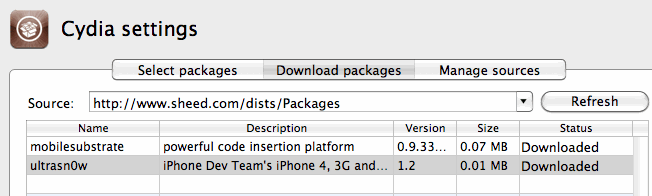
Now PwnageTool can download my file finally. Yay!
I just need to select it in PwnageTool / Packages as below, and build my ipsw to test.
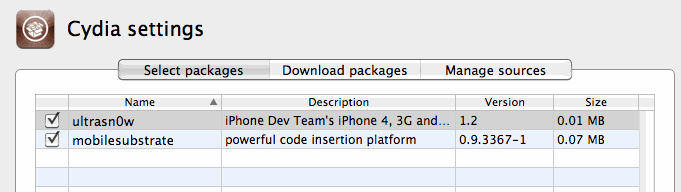
Now I can finally make my own Ultrasn0w firmware woohoo!
Not as hard as it seems, but not as easy either!
I’ll leave my UltraSn0w repo at http://www.sheed.com/dists/ for now, but will probably move it elsewhere at some point, and update this post. So, if you need it, get it while you can.
Lawrence.
Do you like this article? Share It!


Archives
- November 2019
- October 2019
- August 2019
- April 2019
- February 2017
- September 2016
- June 2016
- May 2016
- September 2015
- August 2015
- June 2015
- April 2015
- December 2014
- October 2014
- September 2014
- July 2014
- June 2014
- April 2014
- October 2013
- July 2013
- May 2013
- April 2013
- March 2013
- January 2013
- December 2012
- October 2012
- August 2012
- July 2012
- June 2012
- May 2012
- April 2012
- March 2012
- December 2011
- November 2011
- October 2011
- September 2011
- July 2011
- May 2011
- April 2011
- March 2011
- February 2011
- January 2011
- December 2010
- November 2010
- October 2010
- September 2010
- August 2010
- July 2010
- June 2010
- May 2010
- April 2010
- March 2010
- February 2010
- January 2010
- December 2009
- November 2009
- October 2009
- May 2009
- April 2009
- March 2009
- February 2009
- January 2009
- December 2008
- November 2008
- October 2008
- September 2008
Categories
- Apple
- Arcade Machines
- Badges
- BMW
- China Related
- Cool Hunting
- Exploits
- Firmware
- Food
- General Talk
- government
- IP Cam
- iPhone
- Lasers
- legislation
- MODx
- MySQL
- notice
- qmail
- requirements
- Reviews
- Service Issues
- Tao Bao
- Technical Mumbo Jumbo
- Things that will get me censored
- Travel
- Uncategorized
- Useful Info


