UPDATED May 5 2010
Note: I don’t personally own an N310. I don’t have access to one either, as the owner of this one went back to the States with it.
Updates to this page are mostly from the comments people have made. When I can assist I have / will, but as I don’t own an actual N310, I rely on you for feedback!
One of my friends brought round a notebook for me to Hackintosh yesterday. Unlike the usual god no… kind of options I get given, this is actually a nice machine.
This one is almost as Mac friendly as my current Nano sized Hackintosh (aka Loz’s Hackbook Nano)
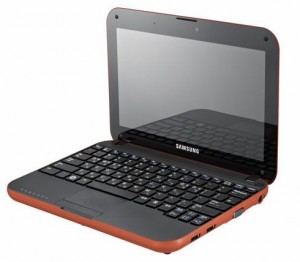
I present the next best thing in Mini Mac’s (until the will it? won’t it? Mac Tablet comes out! (ok, so it came out already, and its a bit meh..) ) – The Samsung N310
The Samsung is a generic Atom based Netbook with the following hardware:
CPU Intel Atom N270, 1600 Mhz
Chipset Intel 82945GSE Graphics Controller
Graphics Card Intel GMA 950
Audio Realtek ALC272
Wifi Atheros AR5007EG Wireless
Ethernet Marvell Yukon 88E8040 PCI-E Fast Ethernet
Bluetooth Adapter USB Based Generic
Webcam USB Based Namuga 1.3M
Installation is remarkably easy.
You’ll need the following things – an External USB DVD drive, and Snow Leopard.
Suggest before you install anything, update your BIOS to the latest version. This should be something like BIOS version 06BA or newer.
The bios updates are windows only, so you’ll need to do that before installing OSX, or have some other method of booting into Windows afterwards (google for Hiren Boot CD 10 for something that will provide a bootable Windows XP amongst other tools).
There are two bios files that are available currently. This first one is the one that you will likely have to use:
http://downloadcenter.samsung.com/content/FM/201002/20100203094911375/Win_N310_06BA.exe
And here is the second one:
http://downloadcenter.samsung.com/content/FM/201003/20100302094206890/Win_N310_01BD.exe
CHECK YOUR VERSION OF YOUR BIOS IN YOUR BIOS. IF YOUR VERSION ENDS IN A “BA”, USE THE FIRST ONE. IF IT ENDS IN “BD”, USE THE SECOND ONE.
Ready?
Download the latest NetbookInstaller ISO from here – http://osx.mechdrew.com/downloads/
Burn to CD. Connect your USB drive to the N310, and boot off of the newly burned CD.
Follow the instructions to swap with your Snow Leopard DVD at the appropriate time, and boot into the installer.
Install as normal (in my case, I just wiped the existing partitions, set the boot type to GUID instead of MBR in Partition, Options, and did a full install)
Once the OS reboots (or finishes with a cannot install error right at the end – don’t worry, its not a problem!).
Reboot into the NetbookInstaller ISO again, but this time choose the HDD (as we still need to install a valid bootsector for the OS to run)
The OS should boot up ok, fill in the relevant bits and pieces, and get to the desktop screen.
Open up NetBookMaker from the CD, navigate to the Tools folder and open NetbookInstaller:
I did this using 0.8.3RC4, but newer versions should be similar. Current version is 0.84rc1 as of April 2010.
Click Continue for the Unrecognized Hardware Prompt.
Choose the correct disk in the Volume Dropdown, and
Check Install Chameleon 2
Check Install General Extensions
Check Generate a System Specific DSDT.AML file.
Uncheck everything else.
Click Install.
It should trundle away for a few minutes, then recommend you reboot.
Remove the NetbookInstaller DVD, and make sure that you can reboot ok from the Hard Drive
Right now you should have working Webcam, Video, Bluetooth, and Trackpad will support 2 finger scroll (go to System / Preferences/ Trackpad to configure)
We’re still missing Wifi, Audio, and you’ll notice that sleep doesn’t quite work yet.
To install those, we’ll need to set some BIOS parameters, and replace the wifi card.
Wifi – the original card is a crap atheros. I couldn’t be buggered looking for drivers, and immediately swapped it out for a Dell1390 Broadcom card. Cheap, and the same as real Macbooks, so no driver issues. Should be about $8 on eBay (RMB50 or so locally in China on Taobao).
The N310 is reasonably easy to disassemble, just remove all the plastic plugs underneath (including the larger feet ones), and remove the screws. Gently remove the case bottom, and replace the wifi card.
If you use the Dell1390 you won’t need to install any drivers, they’re built in, yay!
Enabling Sleep / Brightness (working on 10.6.3 / BIOS 06BA apparently ) -
Go into the BIOS and set the following:
EDB = Enabled
Legacy USB Support: Disabled
USB S3 Wake-Up = Enabled
Boot into OSX
You’ll need to replace the DSDT.aml from NetbookMaker with the one below.
I’ve uploaded a DSDT.aml for the n310 here – DSDT.aml.
To use, rename file to DSDT.aml, and copy to /Extra, then reboot.
This also apparently works for Brightness control with the latest BIOS revision on 10.6.3. You’ll have to change brightness from the System Prefs / Displays / Brightness though, as the function keys aren’t mapped.
Note: If you do mess around with DSDT.aml files, please have a working recovery method available that you can access the hard drive with (eg an OSX Install DVD + Boot132 CD). Apple’s install DVD can also be used for recovery.
If you find that you can’t boot after installing the DSDT.aml, boot from the Boot132 CD or USB, then boot into to the OSX install DVD. Go to terminal in the installer, and delete the offending file, then reboot.
For the remaining drivers:
Download the zip below for modified Bluetooth (to enable bluetooth on / off keyboard switch), and 10.6.3 compatible Audio drivers (kexts) for the N310.
Thanks to Breathless for modifying the Bluetooth, and emailing me both files.
Samsung N310 Audio and Bluetooth Kexts
Copy to /Extras/GeneralExtensions, then rebuild the Extension cache.
You can do that manually or use a tool. NetbookInstaller nicely places a program called UpdateExtra into the /Extra folder which can rebuild the Extension cache for you. Reboot once done, and you should be good.
Thats pretty much it!
—-
Now you should have a fully working Samsung N310 running OSX Snow Leopard!
The brightness (via Displays System Prefs panel), sleep, audio and bluetooth should all be working fine. The wifi too (assuming you replaced the mini pci-e card as recommended)
The volume on/off keyboard functions should work, the trackpad on/off.
Thanks to Breathless for the feedback so I could update this page.
Good luck with yours!
Useful links:
http://www.kexts.com – kexts (drivers) for OSX
http://www.superhai.com/darwin.html – Power related drivers for OSX
http://osx.mechdrew.com/ – MechDrew from MyDellMini’s site on Hackintosh Installs
http://cid-8b65993ef55cf014.skydrive.live.com/browse.aspx/.Public/OSx86/Snow%20Leopard – some Czech site hosted on live.com full of goodies/ kexts
383 Comments to “Samsung N310 (Samsung Go) Hackintosh Installation on Snow Leopard”
Post comment
Archives
- December 2011
- November 2011
- October 2011
- September 2011
- July 2011
- May 2011
- April 2011
- March 2011
- February 2011
- January 2011
- December 2010
- November 2010
- October 2010
- September 2010
- August 2010
- July 2010
- June 2010
- May 2010
- April 2010
- March 2010
- February 2010
- January 2010
- December 2009
- November 2009
- October 2009
- May 2009
- April 2009
- March 2009
- February 2009
- January 2009
- December 2008
- November 2008
- October 2008
- September 2008
Categories
- Apple
- Badges
- BMW
- China Related
- Cool Hunting
- Exploits
- Firmware
- Food
- General Talk
- government
- IP Cam
- iPhone
- Lasers
- legislation
- MODx
- MySQL
- requirements
- Service Issues
- Tao Bao
- Technical Mumbo Jumbo
- Things that will get me censored
- Travel
- Uncategorized
- Useful Info
Most Popular Posts
- Samsung N310 (Samsung Go) Hackintosh Installation on Snow Leopard (9943)
- BMW Keys and Transponders E36 E38 E46 etc (EWS2) (7420)
- eFrontWPI - Wordpress integration Plugin for eFront (7338)
- IPCam Hacking - pt#2 (6796)
- IP Cam Hacking – pt#5 (4708)
Tags
Recent Comments
-
tryphon: It helped me to fix mine. I used a pair of pliers like you did and it worked fine. I drink a coffee typing...
-
mark: I have a ms10105 v4.1 moshisoft board and here is the pinout: 1 y stepper a (yellow) 2 y stepper a (white) 3...
-
Lawrence Sheed: Haven’t taken a deep look yet, probably next month can check it out. There are people who are...
-
mark: Yes…that moshi software is crap. I used the corel draw plugin for awhile but it only works about 20% of...
-
Kunlun: I tried to get my motorbike lesson after my car driving lesson, they answered me that I needed to wait 1...
Recent Trackbacks
- SISTEMAS O.R.P: Recuperar una cámara Zaapa CIP-RW después de un fallo de actualización
- Blog - DO Bots: Brookstone Rover AC13
- How can I stop Pop3 Brute Force attacks: need to create a regex, and add it to fail2ban Here is a guide....
- shanghailoz is our latest member! -:
- Probleem bij installatie op Samsung N310:


ICP Permit
Webmail
Newsletters
Support

Does anyone know how to update the BIOS without windows installed on the hard drive?
The Samsung 06B Bios installer seems to be a windows installer of size 1.7MB.
Thanks
-Adriano
Maybe you could use a Live CD….(anyway that’s horrible) but that’s the only chance to update!
ah….Does anyone know how to change resolution to 1024×768? The maximum displayed to me is 1024×600 and i cannot use properly Garageband or Photobooth..Thanks!
I use a program called statusbar.. it’s like a reverse zoom!!
Where can i find StatusBar??? Search on Google and no results….
here you find statusbar (post n°14):
http://www.insanelymac.com/forum/index.php?showtopic=200260
here you find screen scale (post n°10):
http://www.insanelymac.com/forum/index.php?showtopic=218535&start=0&p=1470429&#entry1470429
I haven’t tried the second yet..the first is working perfectly
This is the BEST guide to get work snow leopard on the n310 THANK YOU!!!!!!!!!!
Hey you guys!!
Anyone has tried to get works the Wireless card known as Atheros5007EG ?
One of InsanelyMac has installed Leopard 10.5.8 and then replaced with IO80211Family_kext_v.2.1.2 file that it can be easily find on Google and get the same Wifi card works!!
http://www.insanelymac.com/forum/index.php?showtopic=200485
Is there any chance to get it on Snow Leopard? Just replace that extension? Can anyone have a try?
Thanks!
Thanks for the simple instructions.
My Samsung came with Windows pre-installed on C: drive and an empty D: drive, both about 72 GB. Can I just install Snow Leopard on the D: drive without reformatting? Also, is there any problem with putting the Leopard installer and the Netbooksinstaller ISO on the same 8 GB memory stick and doing the installation from that instead of a CD drive?
You would need to make a modification in order for OSX to let you install it on an MBR formatted disk.
http://osx86.sojugarden.com/downloads/#osinstall
I bypassed this by leaving my windows installation as is, putting in a different hard drive that was empty, installing OSX on it as GUID, then after installation I made an Image of the OSX partition using disk utility, then popped my original hard drive back in with the Windows installations on it restored the OSX image from the OSX installer. In this case it doesn’t limit you from RESTORING an OSX image to an MBR formatted drive. You would then need to install the chameleon bootloader to the OSX partition that is now restored alongside your windows partitions by booting off the netbookinstaller cd (since the restored OSX will not contain the chameleon bootloader – even though it was an image of one that did contain it). Hope this helps.
Thanxz a lot Lawrence and all the others participating,
everything works nice until i install the update to 10.6.3. Then QE/CI disappears which is a bag of hurt.
Does anyone have a solution to this???
And what are the major changes in between 10.6 and 10.6.3???
Thanxz again to everyone!
please update your kexts sebastion. Run the updateextra, as well as repairing disk permissions using diskutility. Unless you have a different revision of gpu, there is no reason for you to lose acceleration.
Everything works like charm with 10.6.
I hope you’re right – and will try again… ? System Profiler says: 0×0003. Is that yours?
Somebody has update to 10.6.4?? I installed it, but now not recognize CPU, I boot with “recovery=yes” and boots, but run terrible slowly. I go back to 10.6.3 and now work fine.
10.6.4 is out any ideas??
I updated to 10.6.4 and got a kernel panic, and couldn’t get into safemode. Something about the cpu not being supported. After doing a bit of research I found that you can type recovery=y to get it to boot. Then after this, I had to reinstall NBI Installer. Then I could boot fine. The problem is that my system is now slow a molasses with 10.6.4. It boots up very slow and performance just isn’t the same. I tried to run the updateextra and repaired disk permissions but it didn’t help. I also tried booting into safe mode (which was suggested elsewhere) and then just rebooting, but nothing helped. It seems that performance issues are common with 10.6.4. My advice to everyone here is to NOT UPDATE TO 10.6.4 until this is all sorted out.
i’ve updated with the combo and then with the new nbi launche with recovery=y..
My n310 seems to have the same performances and the same boot time of the 10.6.3..
anyway I don’t know if the cup usage is the same..
i had only to reinstall the audio kext and changed the dsdt.aml
the only thing that doesn’t work is the bt on/off..
I am having the same problems as Sebastien, 10.6.1 and 10.6.2 updates work like a charm, but as soon as the 10.6.3 or 10.6.4 update combo’s were installed the system simply restarts and cannot be booted into safe mode. any suggestions, the first time after installing 10.6.3 It seemed to be a different error from the one after I reinstalled the whole thing and went straight for the 10.6.4 combo update, which gave me a sleep error on startup, would prompt user “y” to bypass sleep enabler or something to that effect.
I would like to get either of these updates working any suggestions?
I also had downloaded a copy of the snowywind which was 10.6.2 with no way of getting it to be restored to the disk using disc utility…all from usb/dvdrom drive. any success with loading that onto an n310?!?
i’ve found a way to get the update working, now everything works except bluethoot on\off, so the bt is always on…any ideas to fix it?
Got almost everything working on 10.6.4. Except for the bluetooth switch and the N310 won’t sleep when closing the lid. And the power manager does not recognize that a power adapter is connected (the battery indicator changes for a second when the adapter is connected and then switches back to battery mode). Charging works however.
Basically running on NetbookInstaller 20100616212351, a new wifi card plus the audio and bluetooth kext’s mentioned above.
Any idea on how to fix these last couple of minor annoyances?
For the sleep-on-closing-the-lid problem I have tried the new LidSleep.kext (1.2) but that didn’t help.
Is there any way to map the brightness controls to the correct keys? Where is that done, in the DSDT.aml file or somewhere else? (Still trying to understand what is and isn’t in the DSDT.aml file) and how everything links together.
Ok Homies,
Here is how I fixed my 10.6.4 issues.
I initially did the update via software update. This left me with terribly slow performance, no audio, and no working bluetooth.
To remedy this, download the 10.6.4 package:
http://support.apple.com/downloads/DL1048/en_US/MacOSXUpdCombo10.6.4.dmg
Install it.
Reboot and use the recovery=y flag to get into OSX. You will get a kernel panic if you don’t.
Once you get into OSX, run NBI installer (reinstalling the bootloader, etc) and reboot. This left me with “hibernate image is too old” message, but it would still boot now without the recovery=y flag. To get rid of this message (if you get it), open up a terminal window and do the following commands one at a time and then reboot:
sudo pmset hibernatemode 0
sudo rm /var/vm/sleepimage
The hibernate message should now be gone.
Now, use kexthelper to reinstall your audio and bluetooth kexts. Before using kexthelper, I just tried to manually reinstall the audio kext and repairing permissions didn’t work…. i had to use kexthelper. After using kexthelper and rebooting, I had audio again. Bluetooth on and off works, BUT clicking on the bluetooth icon to get to the menu takes a very long time to activate the menu. Be patient. After you make your selection, I noticed that my “turn bluetooth on” or “turn bluetooth off” choice didn’t take effect until after one or more reboots. I can live with this
FYI, my performance is now pretty much back to normal. I am no longer getting the terrible hard disk trashing and super slow boot up that I was getting before.
Have fun
B
I do however suggest that for now that anyone who is still using 10.6.3 to KEEP IT, and don’t install 10.6.4 if everything is working properly. There is simply no reason to potentially degrade your N310 Hackintosh performance since everything was perfect in 10.6.3
I’m on 10.6.3 now. Everything fine except the “can’t turn of bluetooth” issue.
Thanks again everybody!
HOW TO FIX THE BRIGHTNESS CONTROLL WITHOUT PROGRAMS (thx to mrmojorisin17)
-you have to delete the ApplePS2Controller from general extensions the run udate extra
-install with kexthelper VoodooPS2Controller.kext (just write it on google to find it)
-reboot
now with Fn+F12 you can decrease brightness and with Fn+Ins you can increase it!
P.S.
now on settings you have twice trackpad icon, look the settings of them to set the trackpad again if you use the two fingers gestures!
Thank you for this tip.
I think this should be added to the guide, as well as the proper procedure to update to 10.6.4.
I’m all good with 10.6.3 only wondering if anyone is finding proper solution for the Fn shortcuts which are at the top of the keyboard. Also I opened my n310 just for the sake of seeing which wifi lan adapter I actually have. its the Realtek RTL8129E… can’t seem to find any kexts or pkgs for this specific chipset. anybody find anything on this for hackintosh osx?
thanks.
as the age old adage goes if you want something done right you had better do it yourself… or something to that extent since it won’t get done at all… I’ve taken the plunge into Xcode and the appleHIDKeyboard.kext to see if I can find the correct lines to edit the Fn keys as well as remainder mapping for the n310… if anyone should care to help or already be an expert on this subject please do send me a message.
Was trying to do something like that also. Couldn’t find the appropriate sources (the only one I could find for ApplePS2Controller.kext was quite old). I’m not sure where to start, AppleHIDKeyboard.kext or ApplePS2Controller.kext? The latter seems the likely candidate? Where did you score the sources? Also the sources for NetBook Installer unfortunately include the compiled kext’s not the sources.
this is all hit and miss for me so I’m checking apple’s developer site for info on those files… i’m just starting with getting on insanely wind as well. I’m quite curious because I have a wind u100 and love the fact that all the kexts for keyboard were perfect the first shot over a year ago when i first got it all done. If anyone can find who made them thats probably our best bet for getting this one done for the n310.
Anyone else having a problems with their keyboard not responding?
Mine was in and out, but would still respond to USB Keyboard input.
I’ve tried several kexts currently using ALC272 (Snow Leopard)
my wireless card arrived today, I installed it and now I ‘ve lost all keyboard input after boot.
even USB key input is lost.
figured it out.. I’m a retard and shouldn’t post at the end of the night.
What was the solution if I may ask ? :p
I’d tried severals times to install, but I failed. I don’t know what I’m doing wrong.
I updated the bios, created the installer CD (from 0.8.3 RC4) boot from it and when I tried to install from the 10.6.3 retail DVD simply didn’t. I get the apple logo for a brief… and then reboot to XP.
It’s frustrating…. Any help?
Could be the 10.6.3 retail with the 0.8.3 RC4?
Press space for boot options, then try a different device id (at the swap disk part).
NetbookInstaller uses Chameleon as the Boot Loader, so you’re best off reading the Chameleon docs here – http://forum.voodooprojects.org/index.php/board,1.0.html
finally. I done the installation properly. I made a USB drive (at less 8GB) formatted wih GUID labelled OSXDVD and done a Restore from a snowleapard 10a432 dmg I’ve got. Updated the BIOS, boot from the NetbookInstaller CD and instead of swap to the Snow Leopard DVD I used the USB drive done. do the installation and continue as say the instructions.
Hi
Got almost everything working on 10.6.3, but even after installing the sebastian DSDT files several time, i still do not have brightness control in the monitor preference and sleep doesn’t work, after sleep when i triy to waking up I got blacl screen an I need to reboot.
any ideas to fix it?
Update—
I finally re-download the DSDT file (maybe the first one was corrupted) and install, now everything work fine, Sleep and brightness. I have remapped the brigthness key with keyboard maestro on contol + up and down, it’s perfect
Hi all,
I’ve successfully used the DSDT published here on a Samsung N130.
Everything is working fine except that the brightness is reset to the maximum at every reboot.
Is there a way to fix this issue ?
Thanks a lot.
I have tried to install 10.6.3 six times now: all failures. I have followed closely the results of Leo and Breathless and the others, and have even tried updating step by step from 10.6 to 10.6.1 to 10.6.2 to 10.6.3 after having tried the combo update a number of times. 10.6.1 and 10.6.2 work like a charm; after I cannot boot into OS X with any boot flag as far as i can tell. Anyone have any insight on this?
Best guide ever. Thanks to all.
10.6.3 keeps losing keyboard and trackpad at boot after one update. My only solution has been to take the battery out and start with just powersource, then it works. Really mystical problen. I suggest that people dont update if not absolutely neccessarry. Otherwise a nice working setup. And thanks for the hilbernate error message tip.
Mmm, I might have found a solution to my brightness issue as described here:
http://myhpmini.com/forum/viewtopic.php?t=1542
I’ll give a try and let you know…
Hi Lawrence,
Very nice guide on the n310 install!! This is probably the only complete and detailed guide for the job!
Because of this, I worry that maybe this information might become lost later, so I am working on archiving key parts and files into a checklist. While I am using quite a bit of the information here, I am passively working on adding to it with my own information as I play with my n310.
One file in partictular I have found very helpful is statusBar. When you install things like Macfuse or Secrets prefPane, System Preferences barely fits on screen! But statusBar scales windows you open to a percentage. So what if you could make System Preferences 70% 80% or 90% of original size? Change the scale percentage in statusBar before opening the app you want, and it’s instantly smaller and fits on screen.
Thank you so much for your guide to installing on the n310– it has helped greatly for many of us and will continue to in the future!
OK WTF, Really, Can’t get Bluetooth actvation working in 10.6.4 for the life of me. Anyone have success with this! the kexts are gone from this page and now. lid close equals no backlight hair is falling out of my head.
Hi ditrist,
Please check here for a mirror. I’ve been collecting mirror links and backing up important files for this guide on my Google Site. Either click on my username, or visit this URL:
http://preview.tinyurl.com/osx86n310
Also, I can use bluetooth perfectly using the kexts from this guide. Install your kexts prior to updating and it should work.
がんばって (good luck) ^^
OK thanks, but i just figured out everything as far as bluetooth goes. the only problem i’m down to is Speedstep. have you ever had this working. really gettin ready to call it quits. inless i just screwed up somwhere i feel like i have turned this os structure in to swiss cheese at this point. but speedstep is where I’m at it’s been hours. even gave voodoopower a stab in the dark and got nothing but KPs this thing is useless burning up the battery in 3 hours. also ended up using a patched dirtybit kernel in the end to to bring back performance, and lost sleep in the process. any help would be great bedtime now at leasst it was only a sunday
Does anyone else have problems with the quality of the microphone? Using Skype or iChat the quality is really really bad. Anyone else?
And did anyone experience any problems with the “Snow Leopard Graphics Update” yet released? I haven’t tried so far…
I accidentally updated to 10.4.6. Working so far – but I’m afraid of putting back the DSDT.aml from this thread. Will it work with 10.4.6?
Sorry – so many questions…
Does the microphone sound good in other operating systems? I have nothing to compare it to as I have used OS X exclusively. I agree, the microphone sounds terrible. My Logitech headset, however, works perfectly with the microphone port.
All,
I’m a newbie to on Samsung– I just bought a new N310 on the basis of the 100% OSX compatible rating on http://www.mymacnetbook.com/compatibility-chart/?chartid=20 but reading these trails fills me with doubt
I’ve done Snowywind on MSI, which is a simple install… was hoping for similar here, can someone advise me which is the simplest, easiest build to use, preferably 10.6.4 Snow Leopard?
THANKS, I APPRECIATE YOUR ADVICE!
For your info this is the new (nicer, bigger disk, but still GMA950) spec:
Samsung N310 – Atom N280 / 1.66 GHz –
RAM 1 GB – HDD 250 GB – GMA 950 –
WLAN : 802.11b/g/n, Bluetooth 2.1 –
Windows 7 Starter – 10.1″ Widescreen TFT
1024 x 600 ( WSVGA ) – camera – black
Hi,
where are the Audio and Bluetooth Kexts, i can’t download them.
http://www.tinyurl.com/OSx86n310
Hello everybody !
Everything worked well, but the link for “Samsung N310 Audio and Bluetooth Kexts” doesn’t work, so i can’t turn off bluetooth, and i don’t have any sound.
Has anybody got a link for these files ?
Thank you.
Please go here. http://www.tinyurl.com/OSx86n310
Hello everybody !
Everything worked well, but the link for “Samsung N310 Audio and Bluetooth Kexts” doesn’t work.
Has anbody got a link for these files ?
Thank you.
Hello there
Thank you for this tutorial, I bought a N310 and it work perfectly.
Except for the wifi. I tried evything possible I think, but I am very new in Hackintosh…
So as you preconised I will buy a Wifi card and the only one I found on ebay is this one :
http://cgi.ebay.fr/Broadcom-Wireless-Mini-PCI-E-Card-DELL-DW-1390-AirPort-/250729283846?pt=FR_GH_Informatique_Composants_Cartes_R%C3%A9seau&hash=item3a60a14106
Do you think this will work well. It is not branded DELL but it looks like the same…
Ok i update to 10.6.5 because in this release there is driver for wifi…but now don’t work
Anyone test or try… go go go create a new guide to update this netbook!
Thanks for all and good day!
I am also trying to recover from a botched 10.6.5 update…. I’ll let you know if I get to where I can boot normally again. In the meantime, I am able to boot using the “recovery=y” bootflag.
Alright homies, got it.
To update to 10.6.5, run the combo updater from here:
http://support.apple.com/downloads/DL1324/en_US/MacOSXUpdCombo10.6.5.dmg
Don’t reboot when it tells you to… instead, run the new 0.8.5 Pre version of Netbook installer from here
http://netbook-installer.googlecode.com/files/NetbookInstaller%200.8.5pre.app.zip
After running, reboot and enjoy. If either it screws something up and you can’t boot, or you already updated to 10.6.5 only to find out that you can’t boot anymore, just use the recovery=y boot flag to get you booted, then run the new 0.8.5 Pre.
Done dizzle.
Does 10.6.5 work with the performance of 10.6.3 once NBI 0.8.5 Pre is installed?
Performance appears to be at least as good if not better.
Thanks fro this great resource, but I’m somewhat confused about which version of NBI I should use for the N310. I’ve managed to install osx once patching a USB copy of 10.6 with NBI 0.8.5pre and installing that. I then upgraded to 10.6.5 and it seemed to work (except for sound), but I was concerned that the extras folders seemed to have a “1201″ DSDT and kexts I’m not sure the N310 needed.
So at this point in time, should I install to the letter with older versions of NBI as per the original instructions on this page, and then only use the newest NBI when I update to 10.6.5 as Breathless did?
Just trying to get it right; thanks!
You did it right, as long as you are updated to 10.6.5 you are good to go. I am still trying to get sound working myself on 10.6.5.
I have those extra kexts in there as well in the “general extentions” folder. As soon as I’m feeling lucky i’ll start removing them one by one and will see what happens – then i’ll let everyone know which ones are truly necessary. If I screw something up, I can always use the recovery=y to get back in as that will load all the necessary backup kexts.
Just use Lawrences DSDT from the original guide Put it in your extra folder. The extra folder has to have a dsdt.aml in the extra folder, and it needs to be named as such. The one in there named “DSDT1201″ would be ignored by the system, thus you don’t need to worry about it.
Thanks, Breathless! I had replaced the 310 DSDT as you suggested. Odd that it weighs in at 20k vs 40k for the generated one. 0.8.5pre is a wip and all the older visible install options in 8.3 are now automated, which makes me question the choices it makes. M’s done an amazing job so far, but we’re still talking ihacks where so many things can go wrong. I’d still feel more comfortable picking options from a list.
I’ll report back here as well if I find a sound solution. Funny how that’s often the first thing to break.
Please post a solution once you get sound working. I can’t update until sound works as it does on 10.6.3
I think VoodooHDA might be the way to go for sound. Might be worth a shot:
http://www.projectosx.com/forum/index.php?showforum=156
http://code.google.com/p/voodoohda/
I tried the “ALC272 (Snow Leopard)” AppleHDA.kext from kexts.com and it works under 10.6.0: both internal speakers/mic and external ones work, and the N310 volume (Fn L/R) works as well. I won’t try upgrading till I get my wifi card, but maybe someone can see if it works in later versions. I simply put it in the “Extra/GeneralExtensions” folder and ran NBI’s UpdateExtra utility and rebooted, so backtracking only involves removing it and update/rebooting again. FYI: I’ve discovered that the N310′s hardware is mostly identical to the NC10, for which there seems to be a lot more community support. The only difference might be what’s visible in the BIOS.
FYI: the above kext is NOT working in 10.6.5 ;(
Thanks for trying, sorry to hear
aight, here is the deal…
For audio with 10.6.5, you need to remove AppleHDA from S/L/E, repair permissions, reboot. Then install VoodooHDA 2.7.2:
http://voodoohda.googlecode.com/files/VoodooHDA-2.7.2.pkg.zip
Reboot….. viola, perfectly working audio.
Also, FYI, I have tested and you can safely remove the following kexts from Extra / General Extentions and still maintain full functionality:
AHCIPortInjector.kext
IOATAFamily.kext
ElliottForceLegacyRTC.kext
KextcacheHelper.kext
VaioPEnabler.kext
IOSDHCIBlockDevice.kext
RealtekR1000.kext
After removing them, repair permissions and reboot. If for some reason you have an issue rebooting, you can always boot with recovery=y
The only thing that is not fully functional for me is bluetooth. The device is active, and I can click on it and try to turn it on, but it never goes on.
Quick little FYI: I used the NBI 0.8.3 final to install 10.6.0. Used the above DSDT with the kexts.com audio driver for the ALC272 in the Extra folder (used “UpdateExtra”). After fixing BIOS settings it all seems to be fine. I then installed NBI 0.8.4 rc1 and then without rebooting installed the 10.6.3rev1.1 Combo update; on first reboot the NBI logo replaced the apple logo to indicate it was working its mojo. After I updated Extra with the suggested BT driver, it all seems to be fine, sound, sleep, wifi is snappy, BT on/off.. I’m stoked! :0)
Thanks for the update Breathless! Does the voodoo audio driver give you full compatibility with both internal and external jacks working? There was some discussion that the voodoo driver creates a feedback problem as it defaults the mic to a high sensitivity level; was this solved? And do you know if the kexts you removed are useless in 10.6.3 as well? TIA.
@AlexB
No Problem! The laptop speakers and headphone jack work perfectly if that is what you are asking. The voodoo driver does create the slight mic feedback issue if your speakers are up too loud, but that is easily remedied by going into the voodoo prefpane and lowering the mic input.
My assumption is that 10.6.5 fixed a few things and thats why I was able to remove so much stuff. You can always give it a shot and see what happens! Its almost foolproof with recovery=y
**correction….. not 10.6.5 that fixed things, but chameleon RC5
Quick question about Bluetooth and Wifi disabling: I notice that when I disable wifi, the wifi LED is still on. So are these devices still on even if disabled in the menu bar? It would be useful to reduce power consumption when not in use.
Other question: does the DSDT in the main article include any speedstep tables? My CPU seems to be running at full speed all the time.
no, it does not